Slide layout reconstruction
Recreate the high-level composition of dashboards and report pages so editing starts from structure, not from scratch.
Upload a screenshot of a dashboard, report page, or chart-heavy slide. ExcelDashboard AI reconstructs the layout so charts, text blocks, and presentation structure are easier to reuse and adapt.
Transform dashboard and report screenshots into editable PowerPoint-style slides with ExcelDashboard AI. Rebuild chart-heavy pages faster and update text, layout, and visuals.
Upload any report screenshot. The AI extracts the structure, rebuilds every chart with live data, and hands you a fully editable slide you can update instantly.
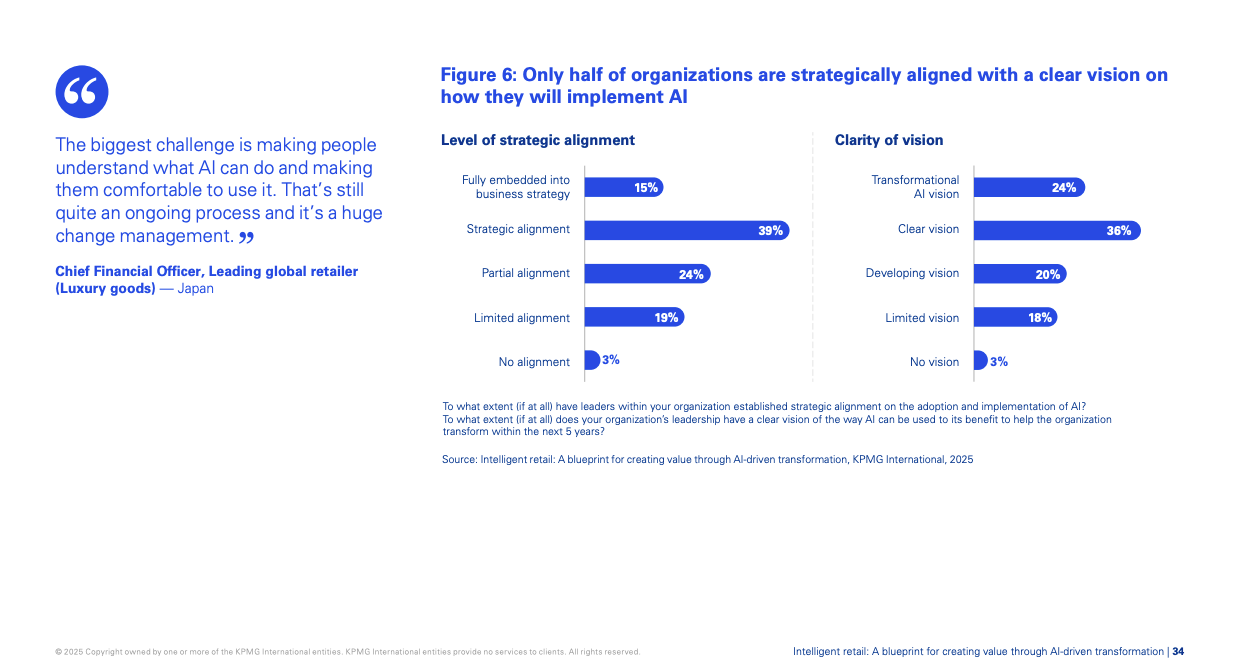
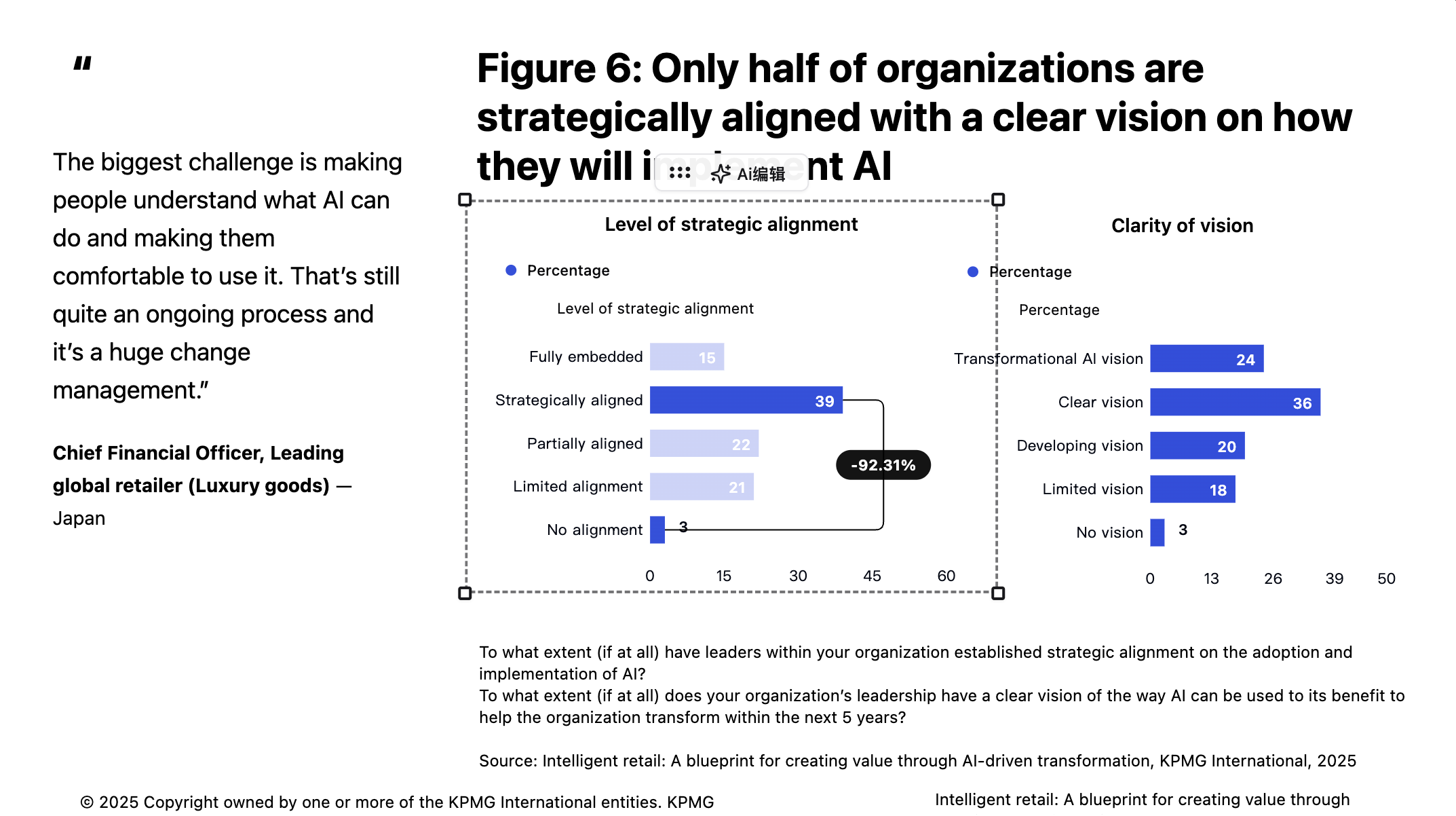
Every data point editable
Change any chart value, label, or percentage directly without redrawing.
Charts rebuilt from scratch
AI recreates bar charts, line charts, and data tables as real editable elements instead of flat images.
Layout and structure preserved
The original slide composition, including columns, callouts, and footnotes, is reconstructed faithfully.
When the only available source is a screenshot or PDF export, rebuilding business slides can be slow and repetitive. Image to PPT helps recreate those pages into editable presentation content, making it easier to update numbers, rewrite messaging, and align the layout with your own template.
Move from raw input to polished output in a guided, repeatable workflow.
Start from a screenshot, exported report image, or chart-heavy slide capture.
The system reconstructs the layout, key text areas, chart regions, and supporting content blocks.
Update the content, align it with your narrative, and incorporate it into a broader presentation workflow.
Built to speed up analysis, creation, and delivery without extra manual work.
Recreate the high-level composition of dashboards and report pages so editing starts from structure, not from scratch.
Designed for chart-heavy business slides where fast iteration matters more than image preservation alone.
Update text, revise storylines, and rebuild visuals more quickly than manual slide redrawing.
Reduce the time required to transform archived visuals into meeting-ready presentation content.
Common scenarios where teams use this feature to save time and improve output quality.
Recover useful competitor, market, or internal report pages from PDFs and rework them into editable review decks.
Convert client screenshots into working slide drafts, then align the narrative and styling with your presentation standards.
Bring charts and summary pages from reports or publications into a presentation workflow without rebuilding every slide manually.
Answers to the questions users ask before they start.
It solves the common issue of having important report content trapped in screenshots or PDFs when you need to update or present it in an editable slide format.
Yes. That is a primary use case. The feature helps turn static dashboard captures into working presentation material.
Analysts, consultants, researchers, and teams that frequently rebuild charts and report pages into presentation decks use it most often.
Yes. The goal is to give you an editable draft that can be adjusted, restyled, and integrated into the rest of your presentation.
Pair this feature with adjacent tools to cover more of your reporting and presentation workflow.
Create AI data presentations and executive-ready reports from Excel, CSV, text, images, or web research with charts, insights, and editable PowerPoint, Word, and Excel exports.
View featureCreate one-page AI data briefings from a topic prompt. ExcelDashboard AI researches the subject, summarizes key figures, and assembles a concise briefing with charts and takeaways.
View featureGenerate charts from a text prompt with ExcelDashboard AI. Search for public data, create sourced visualizations, and turn questions into charts without a spreadsheet.
View featureStart with a free workspace and see how quickly you can turn inputs into polished outputs.